
Buffer Alternative for Threads & Instagram: MARV vs Buffer
MARV vs Buffer, as of November 2026: per-account pricing for 1, 3, and 10 accounts, free plans, Threads, Instagram auto-DM, and AI, and where Buffer still wins.
If you're searching for a Buffer alternative, you probably like Buffer just fine. It's simple, the free plan is generous, and it posts where you tell it to. The thing that usually starts the search is the bill. Buffer charges per channel, and once you add a second Instagram account and a Threads account, it adds up faster than you expected.
MARV charges per account too, so this is one of the few comparisons that's actually apples to apples. The difference is that MARV only does Threads and Instagram. That makes it cheaper and more focused, but it also means it isn't the right tool for everyone. Let's go through it honestly, numbers first.
How much does each one cost for 1, 3, and 10 accounts?
Here's the math with each company's own list prices, as of November 2026. Buffer's numbers come from buffer.com/pricing, and MARV's come from our pricing page. Both are before tax.
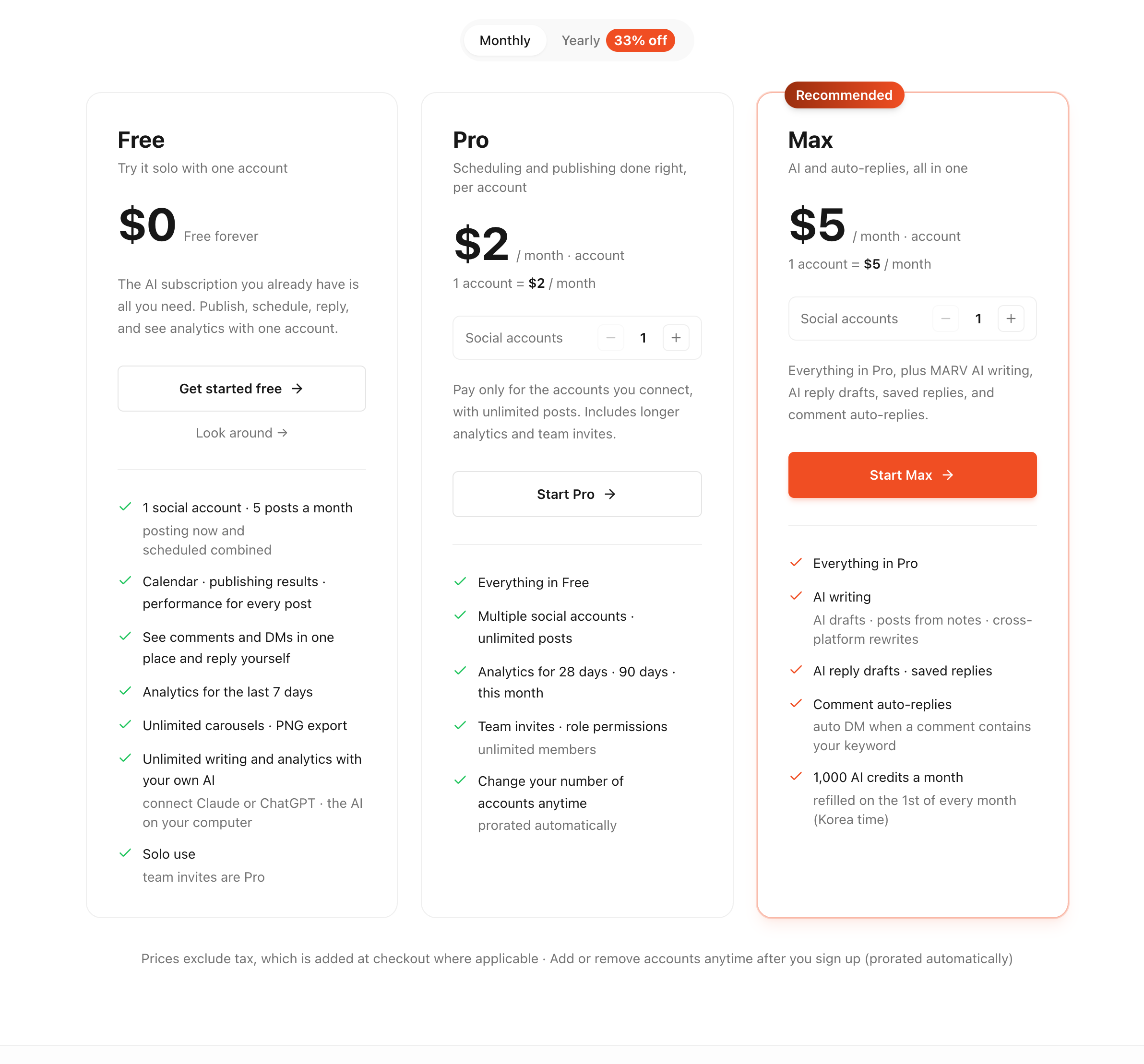
Buffer's paid plans start with Essentials at $6 per channel per month, or $5 per channel per month if you pay yearly ($60 per channel per year). The Team plan is $12 per channel monthly, or $10 yearly. MARV Pro is $2 per account per month ($16 a year), and Max is $5 per account per month ($40 a year).
| Accounts | MARV Pro | MARV Max | Buffer Essentials | Buffer Team |
|---|---|---|---|---|
| 1 | $2/mo (1 × $2) or $16/yr | $5/mo (1 × $5) or $40/yr | $6/mo (1 × $6) or $60/yr | $12/mo (1 × $12) or $120/yr |
| 3 | $6/mo (3 × $2) or $48/yr | $15/mo (3 × $5) or $120/yr | $18/mo (3 × $6) or $180/yr | $36/mo (3 × $12) or $360/yr |
| 10 | $20/mo (10 × $2) or $160/yr | $50/mo (10 × $5) or $400/yr | $60/mo (10 × $6) or $600/yr | $120/mo (10 × $12) or $1,200/yr |
So at three accounts on yearly billing, you're looking at $48 a year on MARV Pro versus $180 on Buffer Essentials. That's the gap most people notice.
Two fair caveats. First, Buffer gets cheaper per channel past 10 channels (its pricing page lists $4 per channel for channels 11 to 25 on monthly billing), so the gap narrows for big setups. Second, a Buffer "channel" can be any network, while a MARV account is always a Threads or Instagram account. If half your channels are LinkedIn and Pinterest, this table doesn't apply to you.
Isn't Buffer's free plan better?
Yes, it is, and we'd rather say that up front. Buffer Free gives you 3 channels with 10 scheduled posts per channel at any one time, 30 days of insights, and one user. MARV Free gives you 1 account and 5 posts a month, 7 days of analytics, and unlimited carousels.
If you only ever want a free tool and you post a few times a week across three accounts, Buffer Free will carry you further. MARV's free plan is really a way to try the whole workflow on one account before paying $2 for it.
Side-by-side: what each tool actually does
Price is only half of it. Here's how the features line up, again as of November 2026.
| MARV | Buffer | |
|---|---|---|
| Pricing model | Per Threads or Instagram account | Per channel (any network) |
| Free plan | 1 account, 5 posts/month, 7-day analytics | 3 channels, 10 queued posts per channel, 30-day insights |
| Threads | Yes, including multi-post threads | Yes (threaded posts: 1 on Free, unlimited on paid) |
| Instagram feed, carousels, Reels | Yes (carousels up to 20 slides) | Yes |
| Instagram Stories | No | Yes, for professional accounts (stickers, music, and links fall back to a phone reminder) |
| Comment keyword → auto DM | Yes, on Max (Instagram only) | Not offered |
| Built-in AI | Max: AI drafts and reply drafts, 1,000 AI credits a month | AI Assistant on all plans; AI reply suggestions (5 a week on Free) |
| Use your own Claude or ChatGPT | Yes, on every plan | Yes, official MCP server on every plan, including Free |
| Analytics history | 7 days on Free, up to 90 days on Pro and Max | 30 days on Free, 2 years on paid |
| Team | Pro and Max: unlimited members with roles | Team plan: unlimited users plus approval workflows |
| Other networks | Not yet | Facebook, LinkedIn, X, TikTok, YouTube, Pinterest, Bluesky, Mastodon, and more |
A quick word on "own AI." MCP (a standard way to plug a tool into an AI chat like Claude or ChatGPT) isn't a MARV exclusive. Buffer has an official MCP server on every plan, too. So if that's your main reason to switch, it's a tie. Where MARV is different is what you can make through that connection, which we'll get to below.
Where Buffer is honestly the better pick
We'd tell a friend to stay on Buffer in a few cases:
- You post beyond Threads and Instagram. LinkedIn, TikTok, Pinterest, YouTube, X. MARV doesn't support those today.
- You rely on Stories. Buffer can schedule them. MARV can't.
- You need long analytics history. Buffer keeps two years on paid plans. MARV goes up to 90 days.
- You need approvals. Buffer's Team plan has approval workflows built in.
- You want the most generous free plan. Three channels beats one.
Where MARV makes more sense
Now the other side. If your audience lives on Threads and Instagram, a few things tip the scale.
It costs less for the same accounts
$2 versus $6 per account on monthly billing, and every paid MARV plan has unlimited posts. For a creator with one Instagram and one Threads account, that's $4 a month on Pro.
Threads gets real attention
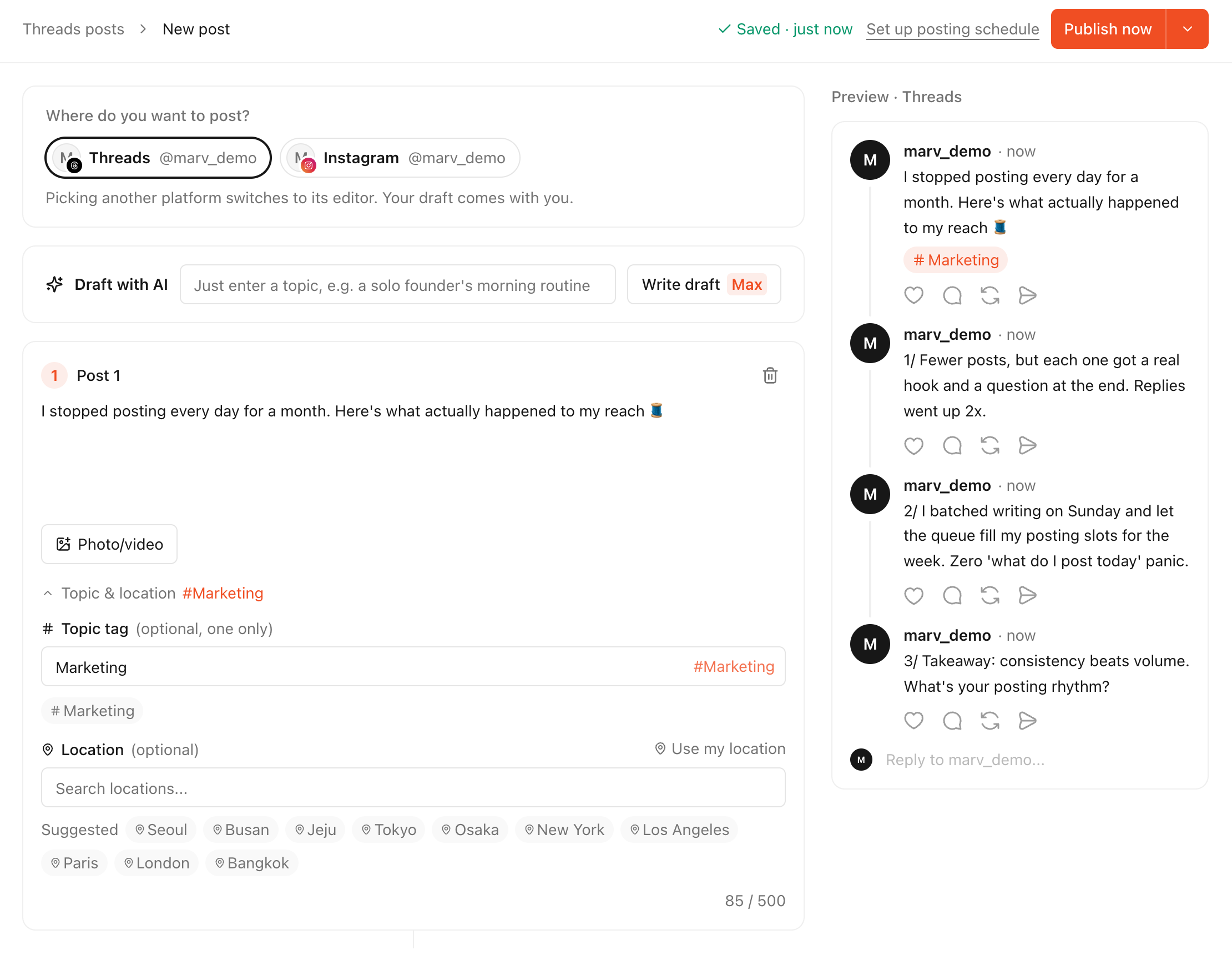
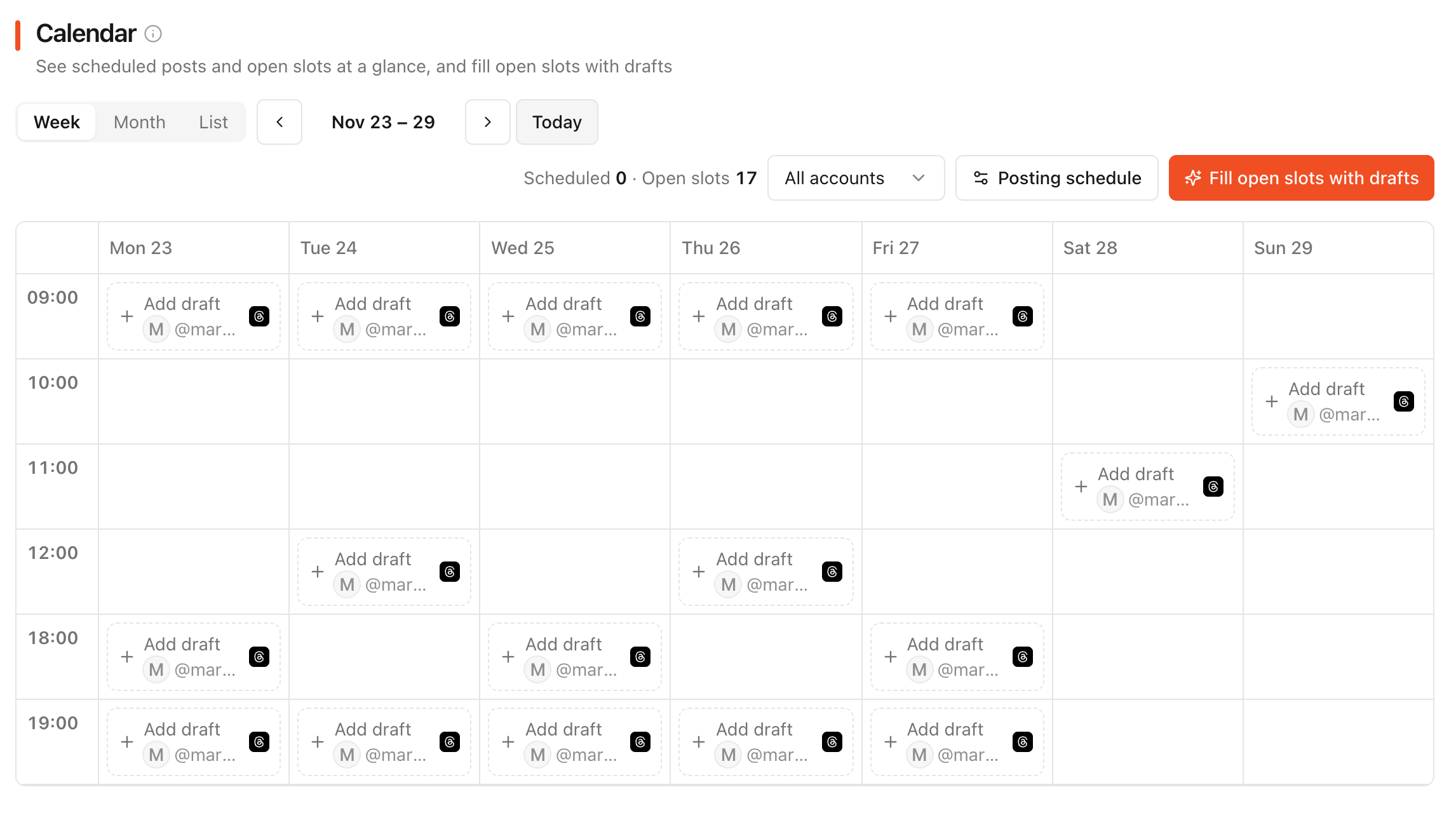
You can write a whole thread, add a topic tag and a location, and see a live preview before you schedule it. Your posting schedule lays out open slots on a calendar, and you can drop drafts into them one at a time or all at once.
Comment "link" and get a DM
You've seen posts that say "comment LINK and I'll send it to you." On Max, MARV does that part for you. When someone comments your keyword on an Instagram post, MARV sends them a DM and posts a public reply. Each person gets at most one DM every 24 hours, and each account sends at most 100 an hour, so it doesn't look spammy. Buffer doesn't list anything like this on its pricing or feature pages, so people who want it usually pay for a separate DM tool on top.
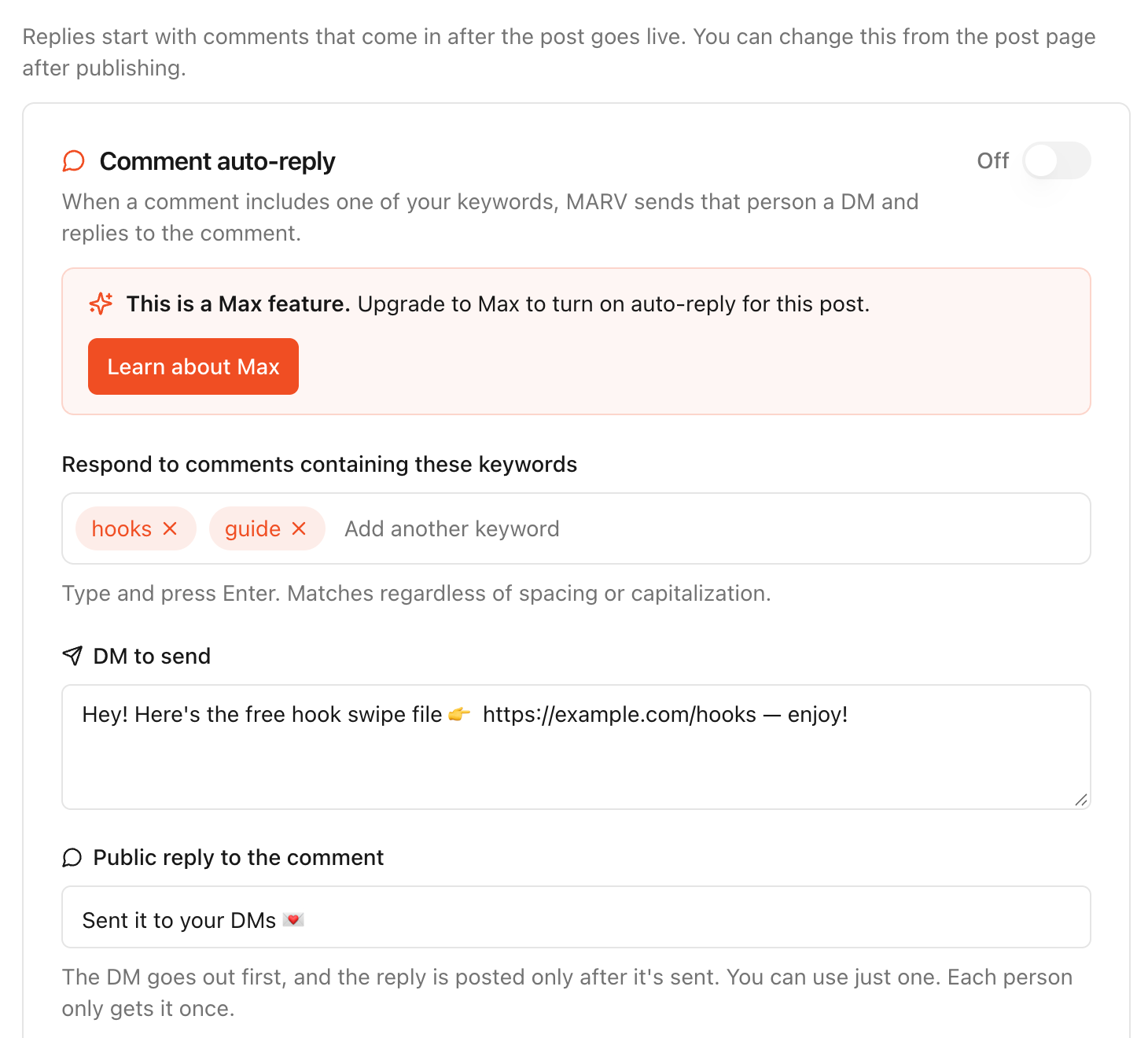
One honest limit: this works on Instagram posts only. Threads comment auto-replies are still in the works.
Carousels made with your own AI, for free
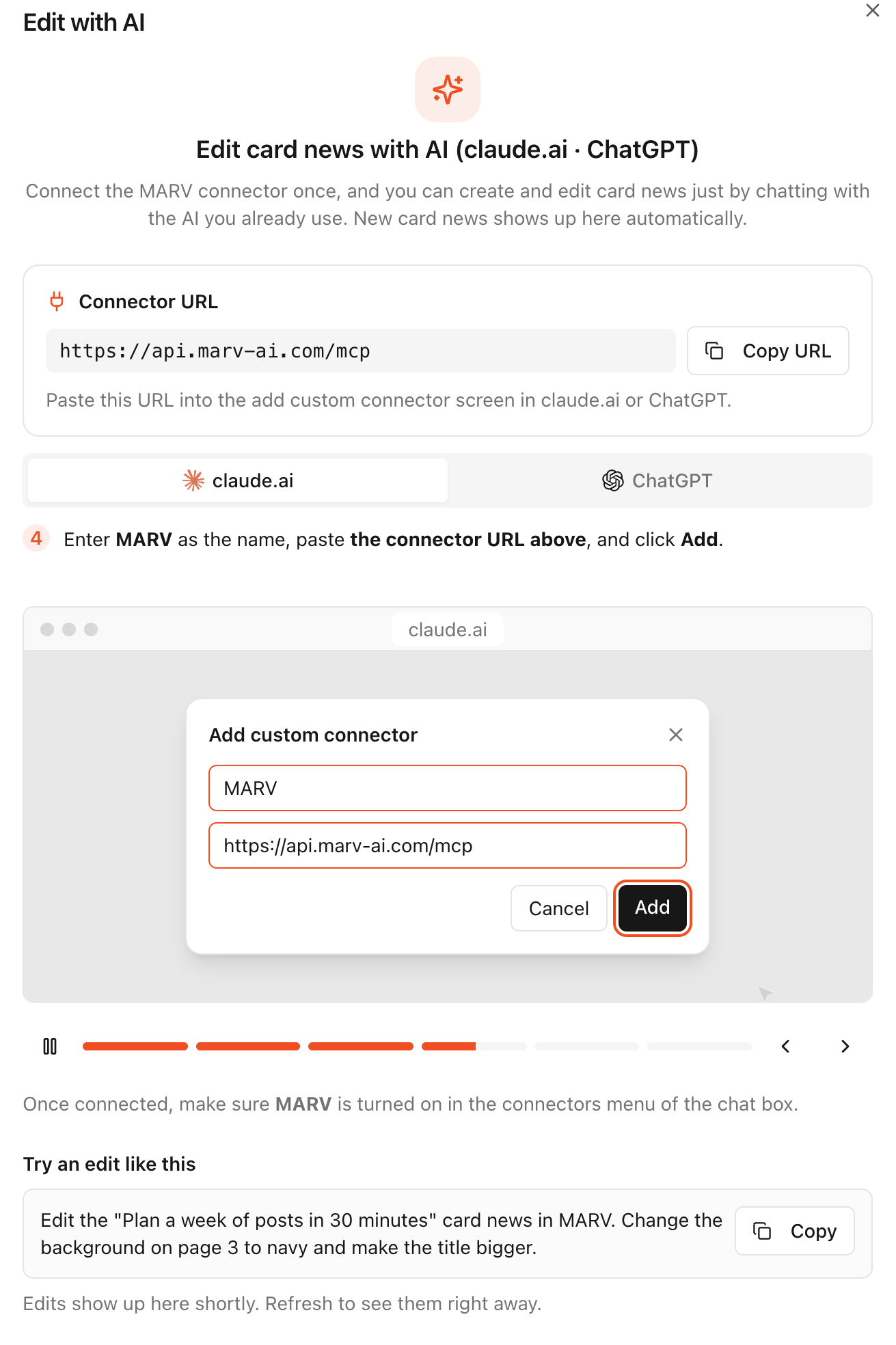
Here's the part of "connect your own AI" that is different. Connect MARV to Claude or ChatGPT, ask for a carousel, and it builds the slides (1080 × 1350) in MARV, where you can edit them, export PNGs, or publish them as an Instagram carousel. Carousel creation is free on every plan, including Free. Publishing still counts toward the Free plan's 5 posts a month.
How do you switch from Buffer to MARV?
It takes about ten minutes. There's no need to cancel Buffer on day one.
- Sign up at marv-ai.com with your email.
- Connect your accounts in Settings → Social accounts. Threads connects in a minute. Instagram needs to be a business or creator account linked to a Facebook Page, which you can switch to for free in the Instagram app.
- Check your history. MARV brings in your recent posts and their performance when you connect, so your analytics don't start blank.
- Set a posting schedule so open slots show up on the calendar.
- Move your queue over. Posts still queued in Buffer don't transfer automatically, so recreate the upcoming ones as drafts and fill your slots.
- Cancel Buffer once your last Buffer post has gone out.
The getting started guide walks through each step with screenshots.
So which one should you pick?
If you manage several networks, Buffer is still one of the best all-rounders around, and its free plan is hard to beat. If your work is basically Threads and Instagram, MARV gets you the same scheduling for a third of the price, plus comment-to-DM automation and AI carousels.
The cheapest way to find out is to connect one account on MARV's free plan and post your next five things from there. If you also want to see how Later compares, we wrote that one too: MARV vs Later.
Keep reading
Try it on your own account
MARV writes posts with AI and schedules them straight to Threads and Instagram.
Get started free